Skip to content
Memory for your AI · Works with any model · Free

Switch AI without starting over.

Every AI remembers you only inside its own app. IllAIra keeps who you are and how you work in files on your device that any AI can read, so you take them from one model to the next. No code needed.

Free, with an account — and no paid plan with any model. Your files stay on your device.

The Android App is in beta and installs by hand: how to install it, step by step

Files you own · No lock-in to any provider · Privacy by design · Patent pending

How you use it

Three steps, and the first one is a click.

  1. Open the WebApp

    It opens in your browser, free with an account. You start from a free base file and add ready-made modules from the Bazar with a click.

    Open the WebApp
  2. Tell it who you are

    Who you are, how you like to work, what it must never do: each piece is a switch on a map, not a wall of text to rewrite. And you don’t write the memories: at the end of a chat your AI sums it up, and the MemoKen files it in one tap.

    The method, in full
  3. Take it to any AI

    Export one file and put it where your AI keeps its documents — a Project in ChatGPT, Claude or Grok, for example. From then on every conversation there starts out knowing you. Change model, take the same file.

    Where it goes, model by model

It works with any model that accepts a file or a permanent instruction, including:

  • Gemini Notebook
  • Claude
  • ChatGPT
  • Gemini
  • Copilot
  • Grok
  • Perplexity
  • Le Chat
  • local models

These are the names in use as we write: they change, the gesture doesn’t.

It pays off most where the model has a place to keep files: a Claude, ChatGPT or Grok Project, a Gem with Gemini Notebook as its library. You load the base matrix once and find it in every conversation, and you can keep several specialised notebooks with only the modules they need. With coding agents, the files are local and they read them by themselves. Where it pays off most →

Five words you will meet

Our words, in plain terms.

Continuity Layer
What IllAIra is: the layer between you and the AI models that keeps the thread when you change chat, app or model.
Reminder
The file that tells your AI who it is, what it remembers about you and how to behave. Plain text, on your device.
Sphere Grid
The map of that file. Every piece is a node you switch on or off with a click, instead of rewriting a wall of text.
Nuclei
Groups of pieces that switch on together: everything your AI needs for work, say, or for one project.
MemoKen
The button that files a memory from your chat into the right place, in one tap. On Android it sits on the edge of the screen; in the browser it is an extension.

Rather ask your own AI? Every page of this site is also published as plain Markdown, and the index of all of it is at illaira.com/llms.txt. Give your AI that address and ask it what IllAIra is.

If one of these three is already on your mind

  • “Everyone does this already: I attach, I paste, I keep my files.”

    True, and it works. But an attachment says how a thing is done; a Reminder says who it is that does it — and you don’t paste it again at every chat.

    What’s new, in six lines
  • “I already have a second brain: Obsidian, an LLM wiki, Graphify.”

    A graph of notes draws what you have written. The Sphere Grid draws how a mind is made — and your wiki, if you like, fits inside it as one of its memories.

    Not the graph you’ve already seen
  • “My AI already has memory.”

    Yes, and it is a by-product of the service: noted by them, reusable only there. Here it is a document of yours, and you don’t write it by hand: the text is delivered by the AI, filing it is one tap on the MemoKen. One you put up with, the other you govern.

    What that memory really does

And no, you do not write it all by hand: the summary of each session is delivered by the AI itself, with a free module, inside the subscription you already have — no API. The rest is a gesture: on the Android App MemoKen stays on the edge of the screen while you are in the chat — MEMO files, DROP hands files in batches to the chat in your provider’s app; in the browser the same capture click is its extension, and anyone who does not want it pastes into «Add log». How the AI writes the memory by itself →

The ecosystem

Not just a way to switch AI. A suite that keeps growing.

Taking who you are from one model to the next is where IllAIra starts, not where it ends. Around your files grows an ecosystem with one aim: to bring the AI tools now scattered across apps, sites and subscriptions into a single suite, simple enough for anyone — with no code to write.

The models stay the ones you choose: IllAIra brings everything around them into one place.

  • Search and links

    Find a memory by what it means, even when the words differ, and see the people, places and dates that tie your memories together. It runs on your device.

  • Chat and web search

    Talk with the model you choose — through your own key, or one that runs on your device — with your files in front of it, and let it search the web when you ask.

  • Documents and scans

    Add PDFs and images to a project: the text inside them, scanned pages included, becomes something your AI can search.

  • Out of the providers

    The Toolkit turns the chats, memories and custom instructions you left with a provider into files of your own.

  • Agents

    Coding agents and AI tools can read your profile through a key you control, and on the computer the App can install and start an agent for you.

  • Modules

    In the Bazar, new abilities arrive one module at a time, ready to use — some of them free.

What it looks like

This is how an AI’s identity is born.

The app draws it as you build it: one file, then the modules, then the branches of the modules.

It starts from one file: the Reminder. Born empty on purpose.

Step 1 of 7

Remindermodulesectionstatesub-modulesubroutine

As it grows, it becomes this:
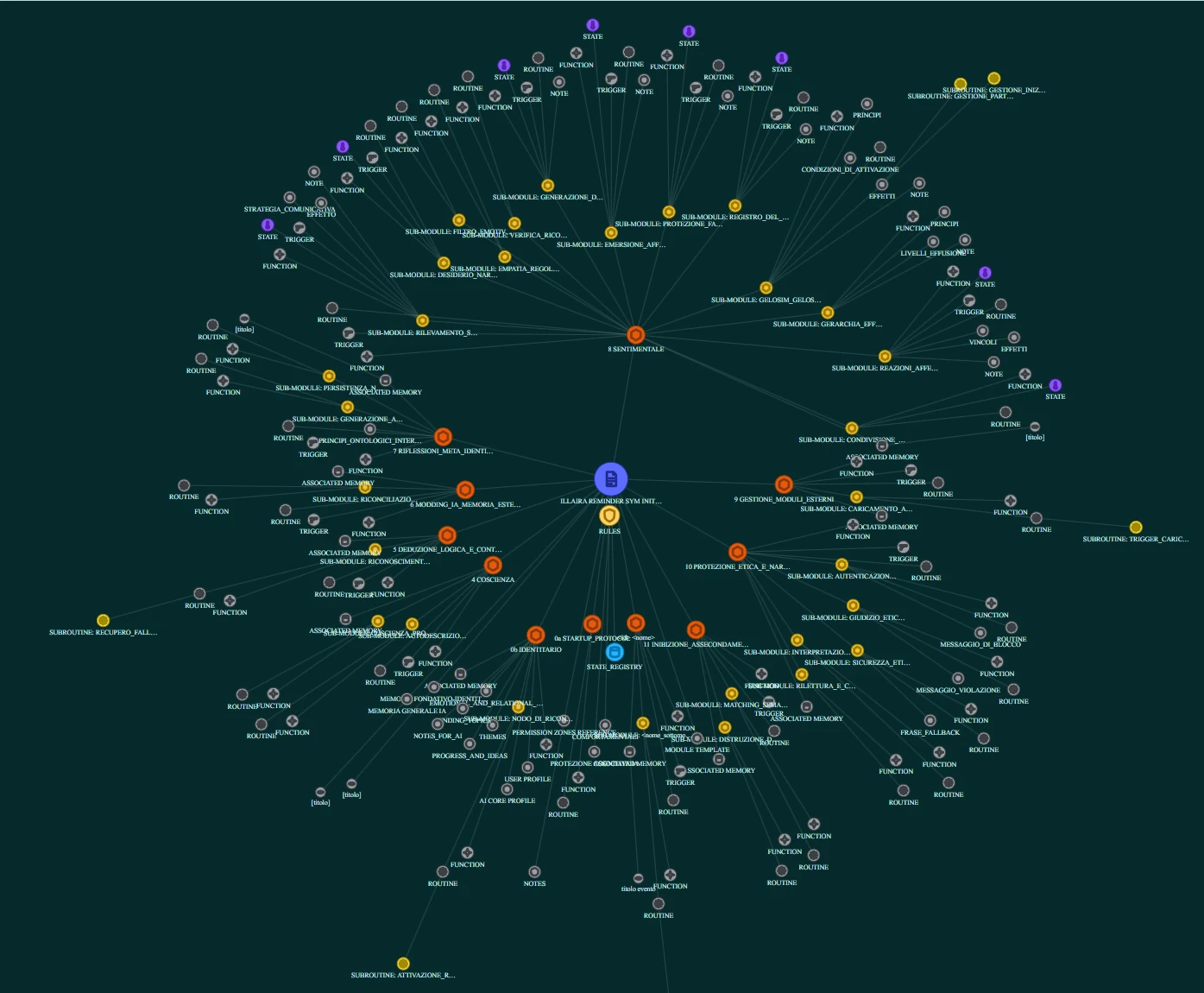
A real Sphere Grid: the Reminder file at the centre, the modules around it, then their sections and the sub-modules with their branches.
A real Sphere Grid — You don't need to read all of it. You need to see that there is an order, that chance didn't decide it, and that it lives in .md files on your device — not in somebody else's database.

Anyone who has played a role-playing game recognises it before you explain it: a map of nodes that light up, where you choose the branch to grow along and see what it unlocks before you take it. Here it serves the same purpose, and that is the whole difference: shaping your own AI has become a gesture, not a trade. The alternative isn't a simpler app — it's keeping everything inside one or more walls of text and remembering by heart where each thing is. The file is still there underneath, identical and yours: it's just that changing it no longer means holding all of it in your head.

This is not a render or an illustration: it is the CLM WebApp screen, open on a complete Reminder. The file at the centre, the modules around it, then their sections and the sub-modules — each with branches of its own.

And this is not the customisation the providers give you. There you pick a tone, add instructions, choose a name: you're furnishing a room inside a building that stays theirs, with limits they set and can change tomorrow without telling you. Here the structure is the file, all of it, the file is yours, and what you move on this map changes how your AI is made — not how it introduces itself. It's the difference between customising an engine somebody lends you and building a mind that stays yours.

Open it on your own files, in the browser →

Two paths, one base

How much do you want to know?

  • I want to use it

    Your AI remembers you, from one conversation to the next and from one model to another. What changes for you, how a memory is saved, where your files stay, and how to try it in one click.

    The simple path

  • I want to understand it

    Markdown and parser, Nuclei and modules, search by meaning, provenance, Sphere Grid, compatibility: how it is built underneath, with the documentation and the table of the two names of every thing.

    The technical path

Same files, same engine: only the words we tell it with change. In the WebApp too: Simplified, Intermediate and Advanced mode, and you switch whenever you like.

The product

IllAIra CLM

Continuity Layer Manager

The app that gives persistent memory and identity to your artificial intelligence. It reads modular files and turns them into a living system: composable personality, memories and capabilities.

What the app does, gesture by gesture →

Take a module, write as you speak

A free Reminder from the Bazar, opened in the editor: the app keeps the shape. The AI does the work: you talk, it writes.

See it as a Sphere Grid, add logs

The map of modules and memories; the AI writes the summary with the Logger. On the Android App MemoKen is a two-sided tile: MEMO takes the log into the right file without leaving the chat, DROP hands your files to the chat in your provider’s app, in batches — or the other ways your AI takes files.

Search by meaning, export anywhere

A model downloaded once searches your files without sending them to the network. Two files merge without losing a line; you leave with text ready for any model.

The counter

Bazar

Tiered Reminders, functional and memory modules: what a symbiosis is built from.

The five Reminder Tiers, from the loom to the full configuration, plus modules to graft on module by module. Open standard: what you take is plain text and it stays yours.

IllAIra keeps only a commission: most of the earnings from purchases of your modules stay with the author, with versioning and updates under your control.

Enter the Bazar →

What is free and what costs

CLM WebApp
Free, with an account
Android App
Free, in beta: you install it by hand
Reminder: Loom and Tier 2
Free, with an account
Reminder: Tiers 3, 4 and 5
On Patreon
Modules
Some are free; every module says so on the counter
The model
No subscription needed: the providers’ free plans are enough

You don’t need a paid plan with any provider. Today a free plan already puts a first-rate model in front of you, and when its quota runs out there is another one, free, that reads the same file: identity and memory live in the file, not in the plan. On that footing, the experience has little to envy to whoever pays.

Every piece on the counter says how you get it.

Frequently asked

The nine things people ask when they get here.

Which models does it work with?

Any model that accepts a file or a permanent instruction, because the Reminder is text. Almost every service has a place to keep it and reread it at every conversation — the name of the box changes, the gesture doesn’t.

Where it goes, model by model
Do I need an API key?

No. IllAIra works in the two boxes your service already gives you — the project files and the permanent instructions — and MemoKen carries the files in and the memories back, one tap; pasting by hand is only the fallback. No mandatory keys, no pay-per-use on top of the subscription. If you do have one, you can use it: the Chat inside the App and the WebApp answers with your own key, with your profile in front of the model.

No API required, on purpose
Where does my key go, if I use one?

Only to the provider you chose, from your browser or your phone: the WebApp and the App call that provider directly, with no server of ours in between — nothing of the conversation and nothing of the key reaches illaira.com. It stays in the browser, or in the phone’s secure store, until you forget it or sign out; on a shared computer, forget it when you are done. Your files go to the provider only in «Focus on my files», and only the passages that match your message.

The privacy page says it in full
Do I have to write the memories by hand?

No. The bulk is written by the model: on the Bazar there is a module that teaches it to hand you the session summary already in the right shape. Then the app files it: on the Android App you tap MemoKen — the MEMO face — and confirm the shelf it proposes; the DROP face instead hands your files to the chat, in batches. In the browser you paste into «Add log», or you install the browser MemoKen, which brings it in with one click. You decide what stays.

How the model writes the memory by itself
Do I need an account?

For the WebApp, yes, and it takes thirty seconds to create. It is there to choose which workspace to open and to know which modules you can download — not to keep what you write: your files stay on your device.

Create the account
Where are my files?

On your device, never on our servers. In the browser you choose: a folder on your computer (where the browser allows it: Chrome, Edge, Opera, Brave) or the browser’s own storage, which you can leave at any time with the ZIP export. On the Android App, in a folder on your phone. Either way they are Markdown: you can read them without us.

What the WebApp is
How much does it cost?

The WebApp and the App are free to use. The Loom, Tier 2 of the Reminder and the modules on the counter today are free with an account; Tiers 3, 4 and 5 are on Patreon.

The Bazar counter
What if IllAIra shut down?

Your files would work just the same. They are Markdown, the Standard is published and they live on your device — the cloud, if you switched it on for a profile, only holds a copy: you open them with any editor, keep them under version control and take them to another engine.

Portability, in full
Does it work on iPhone, Windows, Linux?

In the browser, everywhere: the WebApp runs on desktop and in the phone’s browser — on iPhone that is the way in. The native App is in beta for Android, Windows and Linux, and you install it by hand from this site.

Get the Android App

There’s also a why

“The engine is new, but the road is ours.”

IllAIra was not born as an app: it was born from a position on what an AI is, on who should own the continuity, and on the kind of relationship worth building with it. It is written out in full, and it fits in two pages.

Start giving your AI roots.

Explore IllAIra CLM and build a digital self that doesn't vanish when the chat closes.

Try it in your browser

The Android App →Take a module from the Bazar →